Your first trade: from sign-up to your first sale
What happens between signing up and your first sale, one step at a time.


Joining takes about five minutes. Getting your first sale takes a little more: other members need to be able to find you, see what you sell, and pay you easily. Here's what to set up, in order.
1. Finish signing up
Sign-up is online, with no call. You choose a plan, sign the member agreement and pay for your membership. There are no transaction fees, so the plan price is what you pay.
Every new member starts with welcome credits to spend with any member. It's a gift, not a loan. They do expire if you don't use them, so it's worth picking a first purchase early. Spending is also the fastest way to learn how paying works before someone pays you.
If the app asks you to sign your W-9, do it now. A business needs a signed W-9 on file before it can be paid in credits. The taxes on trade guide explains why exchanges ask for one.
2. Make your profile worth a tap
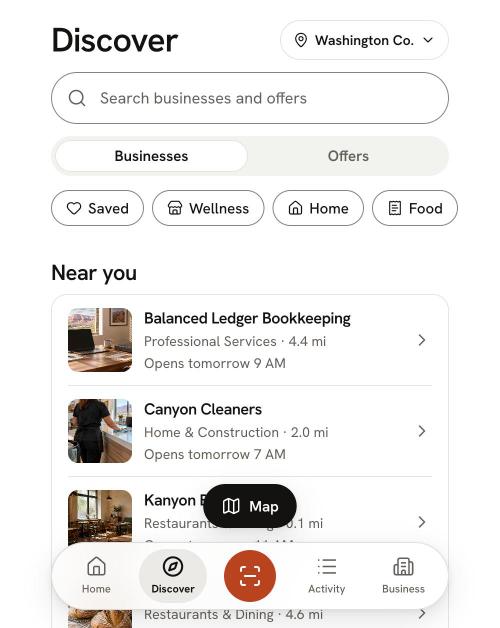
Your profile is what members see when they find you in Discover or on the map. Fill in:
- Your logo. It's your business's picture everywhere in the app. Until you add one, members see your initials.
- A short description. What you do and who you do it for, in a sentence or two.
- Hours and where you work. Your location, or the area you serve if you go to the customer.
- How to reach you. Phone, email or website, so members can ask before they buy.
- Your Google listing (optional). Link your Google Business Profile and your Google rating shows on your profile, with a link to Google.
3. Add your first listings
A listing is something you sell on trade, with a price in credits. Start with two or three things members are likely to want, not your whole menu.
- Price in credits the same as your cash price. One credit is $1 of purchasing power with members, so a $120 service is 120 credits. More on this in how to price your services in credits.
- Services can use a set price, a range or a quote. Use a set price when the job is always the same, a range when it varies by size, and a quote when you have to see the job first.
- Products have one set price. Inventory items are pickup only unless you and the buyer agree otherwise.
- Add a photo if you have a good one.
You choose which offers take trade and when. Cash customers stay exactly as they are.
4. Fill in your want list
Your want list is the other half of trading: the things your business would buy with credits. Start with what you already pay cash for every month, like printing, vehicle upkeep, meals for the team, marketing or bookkeeping.
A want list helps you spot which members to spend with, and the app can let you know when a member starts offering something on it.
5. Get your Get paid code ready
Get paid shows your business's code. A buyer scans it to pay you. Keep it handy at the counter, on a tablet, or printed where customers check out.
If you're not face to face, send a request instead. It works like a bill: the buyer sees the amount and approves it.
How a member pays you
- 1The buyer scans your code, or finds your business in the app, and enters the amount.
- 2The buyer approves the payment. The credits leave their balance right away and show as pending. A business can never pull credits from you, and you can't pull them from anyone else.
- 3The credits post to you when the buyer confirms the trade, or on their own after a set number of days.
- 4If something goes wrong, the buyer can report a problem on that trade within 30 days. Reporting a problem pauses automatic posting while it's looked into.
Once credits post, they're yours to spend with any member. You don't have to buy from the business that bought from you. For a screen-by-screen walkthrough, read how to trade with members in the app.
Your first-trade checklist
| Step | Done when |
|---|---|
| Sign up and pay | Your plan is active and your welcome credits are showing |
| W-9 | No W-9 card on your Home screen |
| Profile | Logo, description, hours, contact |
| Listings | Two or three offers with prices in credits |
| Want list | Three to five things you already pay cash for |
| Get paid | You know where your code is, or it's printed |
| First purchase | You've spent some welcome credits with a member |
Then spend
Members find what to spend on in Discover, on the map and through suggestions in the app. See the kinds of offers on trade. When you have slow stretches to fill, read filling your slow season with trade.
Not a member yet? Get started.
Trade with businesses near you.
Every new member starts with 100 welcome credits to spend with any member. It’s a gift, not a loan, so you never owe it back.